Get 50% Off Your First Month With a Dedicated GHL VA — Christmas Exclusive!
Limited to 10 Agencies - Use Coupon Code XMASVA50

How to Add & Customize the Go High Level Chat Widget for Your Website
How to Add & Customize the Go High Level Chat Widget for Your Website
Introduction
Imagine a potential client lands on your website, has a question, but doesn’t find a quick way to connect with you. Chances are, they’ll bounce and head straight to your competitor.
This is why the Go High Level (GHL) Chat Widget is a game-changer. It allows you to engage visitors instantly, capture their details, and funnel them directly into your CRM for automated follow-ups.
In this guide, we’ll cover:
What the GHL Chat Widget is
Why it’s essential for agencies & SaaS businesses
Step-by-step setup instructions
Customization tips to match your branding
Pro strategies to maximize conversions
What is the Go High Level Chat Widget?
The Chat Widget in Go High Level is a small popup that you add to your website to let visitors chat with you in real time. Unlike third-party chat tools, the GHL widget automatically syncs with your CRM, workflows, and automations.
👉 Example: A visitor asks about pricing on your website. The widget captures their details, logs them into your pipeline, and starts an automated SMS/email follow-up—all without your team lifting a finger.
Why Agencies & SaaS Businesses Love It?
💬 Instant Engagement: Connect with leads the moment they land on your site.
🔄 Seamless CRM Integration: Every chat is saved directly in your Go High Level dashboard.
⚡ Automated Follow-Ups: Pair with workflows to send SMS/email replies instantly.
🎨 Custom Branding: Adjust colors, text, and behavior to match your website’s design.
📈 Higher Conversions: Chat widgets can increase lead capture by 30–40%.
Step-by-Step Setup Guide
Step 1: Access Chat Widget Settings
Log in to your Go High Level account.
Go to Sites → Chat Widget.
Click + New Chat Widget.
Step 2: Customize the Widget
Business Name: Enter your brand/agency name.
Greeting Message: Example:
“Hi 👋 Thanks for visiting! How can we help you today?”Theme Color: Match it with your website’s brand colors.
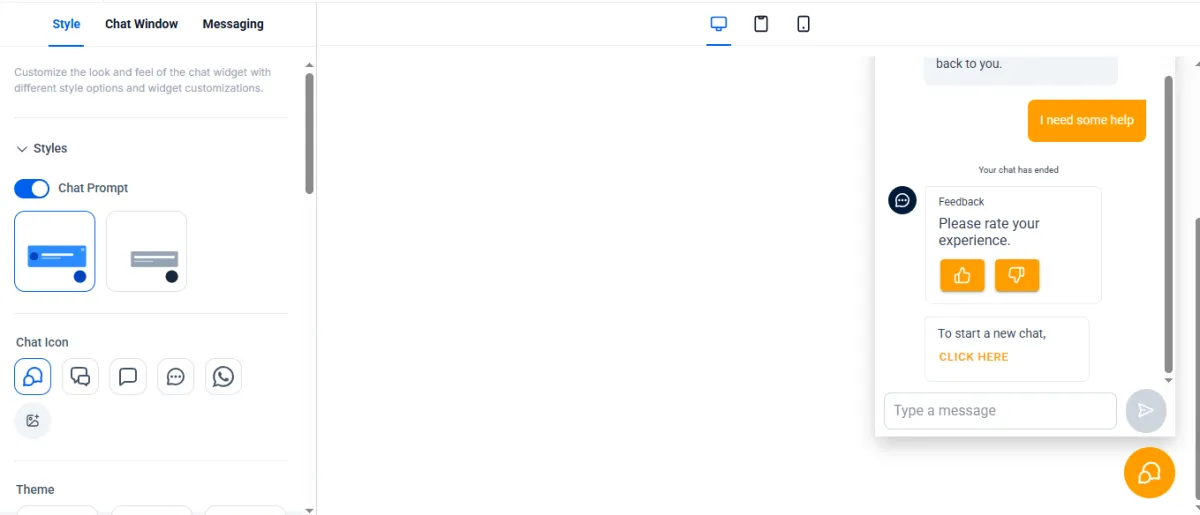
Step 3: Add Widget to Website
Copy the embed code generated by GHL.
Paste it into your website’s <head> or footer section.
If using WordPress: Paste it under Appearance → Theme Editor → Footer.php.
If using Go High Level Website/Funnel: Go to your website/funnel in the settings you'll have the option to add a widget.
Step 4: Automate Chat Follow-Ups
Set a workflow trigger → Customer Replies in Chat Widget.
Add automation: Send SMS → Add to Pipeline → Notify Team.
Example Workflow:
Visitor asks a question → They get an SMS: “Thanks for reaching out, we’ll get back to you shortly. Book here: [Insert Booking Link].”
Customization Tips
Brand Alignment – Use your logo, brand colors, and fonts.
Personal Touch – Add your team photo or friendly greeting.
Placement Matters – Right bottom corner works best for visibility.
Quick Replies – Pre-set common answers like “Book a Call” or “Pricing.”
Call-to-Action – Always redirect to your booking calendar or sales funnel.
Pro Strategies to Maximize Conversions
1. Pair With Missed Call Text Back
If a visitor leaves their number, follow up with an SMS.
2. Use AI Chatbots
Add AI to your widget to qualify leads 24/7.
3. Offer Incentives
Example: “Chat with us & get a free strategy session.”
4. Track & Improve
Monitor widget analytics inside GHL to refine messages.
Real-World Use Cases
. Agencies: Turn site traffic into booked strategy calls.
. SaaS Businesses: Offer instant product demos via chat.
. Local Businesses: MedSpas, plumbers, and realtors use it for appointment booking.
👉 On average, businesses report 2x more leads after enabling the GHL chat widget.
Conclusion
The Go High Level Chat Widget isn’t just another live chat—it’s a lead capture and automation powerhouse. By embedding it on your site, you can instantly engage visitors, funnel them into your CRM, and convert them into paying clients.
💡 Want this done for you?
👉 Book a Free Strategy Call with HL Assistly Or, if you're new, try 14 day free GHL trial here
FAQS
What is the Chat Widget in Go High Level?
The Chat Widget is a live chat tool you can embed on your website that lets visitors message you instantly. It helps capture leads, answer questions in real time, and increase conversions.
Can I customize the Chat Widget to match my branding?
Yes! You can fully customize colors, text, greeting messages, and placement to match your brand style. This makes the widget look professional and seamless with your website.
Does the Chat Widget collect lead information automatically?
Absolutely. When someone enters their details (like name, phone, or email), the widget automatically pushes the information into your GHL CRM. From there, you can add them into workflows, automations, or follow-up campaigns.
4. Can I connect the Chat Widget with SMS or Email follow-ups?
Yes! Once a visitor submits their details, you can trigger SMS, email, or even voicemail automations directly inside GHL. This ensures no lead falls through the cracks—even after they leave your site.
HL ASSISTLY
Quick Links
Useful Links


HL ASSISTLY
Quick Links
Useful Links