How to Build a Medicare Appointment System
Most Medicare agents don't have a system. They have a lead list and a phone.
That's not a system — that's a prayer. A real system runs the same way every time. It generates leads, converts them to booked calls, confirms those calls, and recovers the ones that no-show. Without each piece, you're starting from scratch every week.
Here's how to build the full Medicare appointment system, step by step.
What a Medicare Appointment System Actually Is
A Medicare appointment system is a repeatable process that moves a stranger from "saw your ad" to "on your calendar" — without you manually chasing every lead.
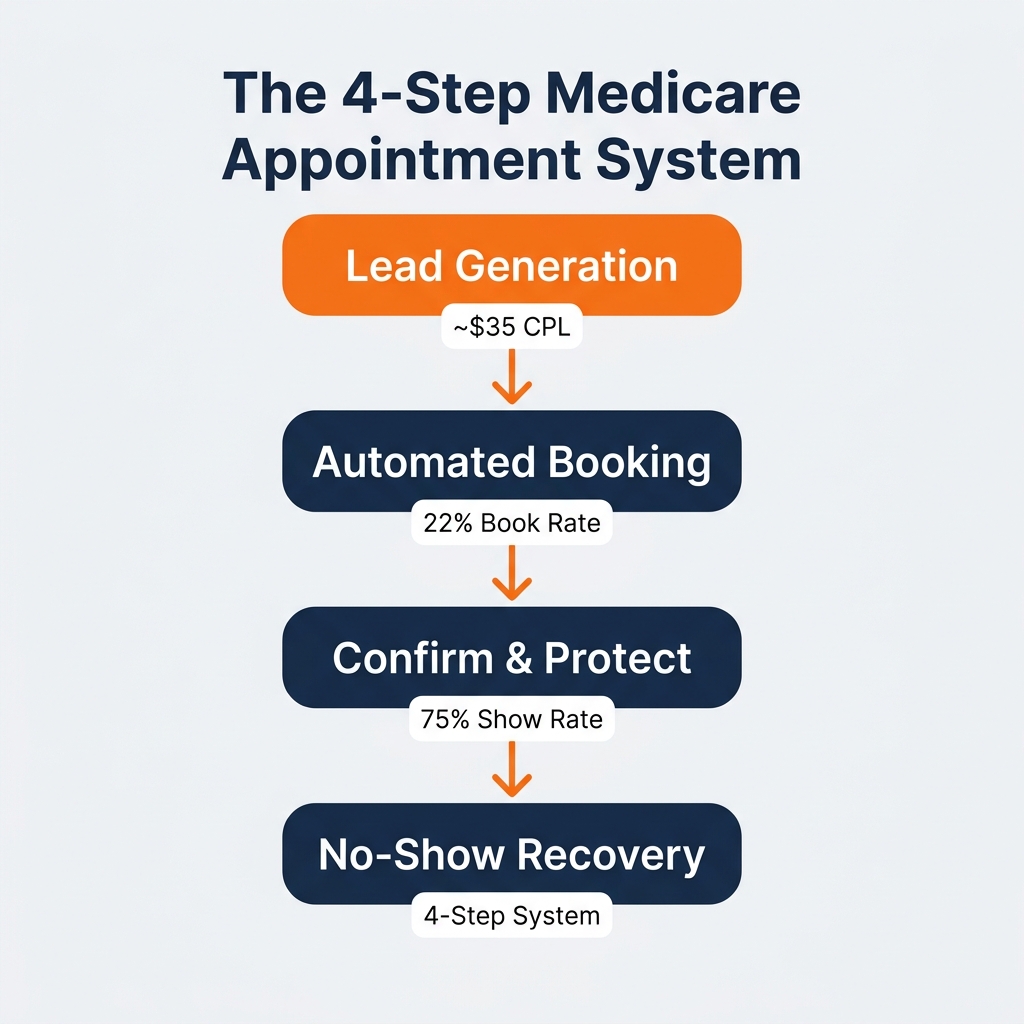
It has four parts:
Lead generation (consistent flow of new prospects)
Booking automation (leads convert to appointments without extra manual work)
Show rate protection (confirmation touchpoints before the call)
No-show recovery (re-engagement when someone misses)
Remove any one part and the whole thing leaks. Most agents are missing at least two of these four.
Step 1 — Generate a Consistent Flow of Leads
The system starts with predictable lead volume. You can't book appointments you don't have leads for.
The best-performing Medicare agents use Meta ads (Facebook + Instagram) to target people turning 65 in their market. About 10,000 people turn 65 every day across the U.S. — and the algorithm lets you reach them before their phone is ringing with competitor calls.
A well-run campaign generates leads at roughly $35 per lead. That's the benchmark. If you're paying $80 for shared leads from a vendor, you're not saving money — you're paying more to compete with five other agents on the same contact.
For a deeper breakdown of how lead generation works, see our Medicare lead generation guide for independent agents.
Step 2 — Book the Appointment Before the Lead Goes Cold
A lead is warmest in the first five minutes. After that, contact rates drop fast.
Your system needs to do three things automatically when a new lead comes in: send an immediate SMS, send an email with a direct calendar booking link, and follow up again within 24 hours if they haven't booked.
Most agents do this manually. That means calling during business hours, leaving voicemails, and losing leads to slow follow-up. GoHighLevel (GHL) handles all of this automatically — a new lead triggers instant outreach before you've even seen the notification.
At a 22% lead-to-book rate, for every 100 leads you generate, roughly 22 become booked appointments. We walk through the exact GHL setup in this post: GHL for Medicare Agents: What the Setup Actually Looks Like.
Step 3 — Protect Your Show Rate
Booked doesn't mean showed. The average Medicare agent runs at a 48–60% show rate. The top ones run at 75%.
The difference is a two-touch confirmation process:
Touch 1: A call or text 24 hours before the appointment. Not a passive reminder — a brief exchange that re-engages the prospect and locks them back in.
Touch 2: A short text 1–2 hours before. "Hey [Name], just confirming we're on for [time]. See you then."
This process alone can move your show rate from 55% to 75%. At scale, that's the difference between 11 shows and 15 shows from the same 20 booked appointments. We broke this system down in detail here: Medicare Appointment Show Rate: The 2-Touch Setter System.
Step 4 — Recover No-Shows Systematically
Even at a 75% show rate, 1 in 4 booked appointments won't show up. That's not a failure — it's expected math with a solution.
A no-show recovery sequence runs automatically in GHL:
5-Minute Call — Call immediately after the missed time. Most agents skip this and it's their biggest missed opportunity.
Same-Day Text — Short, non-pushy: "Hey [Name], we missed you earlier. Still want to connect today?"
Same-Day Second-Chance — Offer a slot later that same day while the prospect is still in their phone.
Next-Day Reschedule — A final outreach attempt the following morning.
A 4-step sequence like this converts a portion of no-shows into rescheduled appointments that would otherwise be lost forever. More on the full recovery SOP here: How to Reduce Medicare Appointment No-Shows.
What the Full System Looks Like in Practice
When all four parts run together, here's what the math looks like:
Meta ad → Lead at ~$35 CPL
Instant GHL automation → 22% book rate → ~22 appointments per 100 leads
2-touch confirmation → 75% show rate → ~17 shows per 100 leads
No-show recovery → a portion of missed appointments rebooked
To generate 25 booked appointments, you need roughly 114 leads at the 22% book rate. From those 25 booked, approximately 19 will show at a 75% show rate. That's 19 live conversations with qualified Medicare prospects — from a single campaign.
A year-round version of this system keeps your calendar full through every enrollment period — not just AEP. See how that works: How to Build a Year-Round Medicare Pipeline.
Our 90-Day Medicare Appointment Sprint is built on exactly this system. We build every piece for you — ads, GHL automations, setter coverage, confirmation sequences, and no-show recovery. The guarantee is 25 qualified appointments in 90 days, or we keep working until you get them. Learn more about the Sprint →
Where Most Agents Are Leaking Appointments
Here's the honest diagnostic. Most agents have Step 1 (some form of leads). They skip Step 2 because they think manual follow-up is "more personal." They have no Step 3 protocol beyond hoping people show up. And they do nothing after a no-show.
The result is a 40–50% contact rate, a 50–60% show rate, and a pipeline that resets every quarter. The agents who fix all four steps stop feeling like they're starting over every month.
Building the full system takes a few weeks. But once it's running, it runs consistently — through AEP, IEP, and every quiet month in between.
Is your current pipeline systematized — or are you still running on manual hustle?
Take the free 60-second assessment and get your personalized Medicare Lead Gen Roadmap. It shows you exactly which part of your system is leaking and what to fix first — free, no pitch.
Get Your Free Medicare Lead Gen Roadmap →
Frequently Asked Questions
Q: What is a Medicare appointment system?
A: A Medicare appointment system is a repeatable process that moves a prospect from ad click to booked appointment — without manual chasing. It includes lead generation, automated booking via a CRM like GoHighLevel, show rate confirmation touchpoints, and a no-show recovery sequence. All four parts need to work together for the system to run consistently.
Q: How many leads do I need to book 25 Medicare appointments?
A: At a 22% lead-to-book rate, you need approximately 114 leads to generate 25 booked appointments. From those 25 booked, roughly 19 will show at a 75% show rate — giving you 19 live conversations from a single campaign.
Q: What CRM do Medicare agents use for appointment systems?
A: GoHighLevel (GHL) is the most common CRM used by independent Medicare agents for automated appointment systems. It handles instant lead follow-up, calendar booking links, confirmation text sequences, and no-show recovery workflows — all in one platform.
Q: Can I run a Medicare appointment system year-round, not just during AEP?
A: Yes. The Initial Enrollment Period (IEP) runs 3 months before and after every person's 65th birthday, which means there are eligible prospects every single month. A well-built system targets T65 leads continuously — not just during the October–December AEP window.