
Stop Guessing Your Food Costs.
Start Running Your Kitchen On Real Inventory Data.
Yes Chef OS is an AI powered inventory and forecasting platform that connects your walk in, recipes, POS, and vendor invoices into one simple operating system. So you know exactly what you have, what you used, and what you need to order next.

The Problem: Restaurant Inventory Is Broken
For most restaurants, inventory is still a painful mix of:
Clipboards and spreadsheets that are never up to date
Walking the walk in and "eyeballing" what is left
Recipes that are not actually connected to real usage
Food cost percentages calculated weeks after the fact
Order guides based on habit, not data


Food waste and lost profit
Over ordering perishable items that expire on shelves.

Running out of key items
86ing menu items in the middle of service.

Inconsistent food cost
Every month looks different, and it is hard to pinpoint why.

Hidden theft and shrinkage
You do not see small losses until they become big problems.

Labor drag
Managers spend hours every week counting inventory and building orders.
All of this eats into your margins in a business where 3 to 5 percent profit can be the difference between thriving and closing.
You do not have a food problem. You have a data problem.
The Solution: Yes Chef OS
Yes Chef OS turns your inventory, recipes, sales, and invoices into a single, live source of truth.
The mobile app uses AI to detect what is in your walk in and storage with a simple phone scan.
The web app pulls in your recipes, POS sales, and vendor invoices.
The forecasting engine tells you what you will need for the next order, based on real usage.
Instead of guessing, you get a clear, real time picture of:
What you have on hand
What it is worth
How fast it is moving
What you should order next
How Yes Chef OS Works
1. Capture Inventory With Your Phone
Forget clipboards
Walk the walk in, coolers, and dry storage with your phone
Yes Chef OS detects items with AI and logs quantity levels
Quickly adjust counts with simple plus and minus controls
Save each scan by date, time, and location
Result: A fast, repeatable inventory process that your team can do without training for weeks.
2. Connect Your POS and Recipes
Yes Chef OS connects to your POS system (starting with Toast) and your recipe library.
Import menu items and modifiers
Attach recipes to each menu item
Link each recipe to real ingredients and portion sizes
Now, every time you sell a dish, Yes Chef OS can calculate how much inventory should have been used.
Result: You finally see true usage instead of just sales and purchases.
Track Food Cost In Real Time
Invoices tell you what you paid. POS tells you what you sold. Yes Chef OS brings those together.
Upload or email your invoices into the system
AI reads line items, prices, and units
Ingredient prices update automatically
Food cost for each recipe and menu item is calculated in real time
Result: You always know your food cost per dish, per category, and for the entire menu, using current ingredient pricing.

Forecast What You Need To Order
Invoices tell you what you paid. POS tells you what you sold. Yes Chef OS brings those together.

Yes Chef OS Looks At:
Recent sales volume
Seasonality and day of week patterns
Existing inventory levels
Lead times and delivery days
Then It Generates:
Recommended order quantities for each item
Alerts when stock is trending low or moving too slowly
Purchase suggestions you can review, adjust, and send to vendors
Result: You order the right amount at the right time, with less waste and fewer 86s.
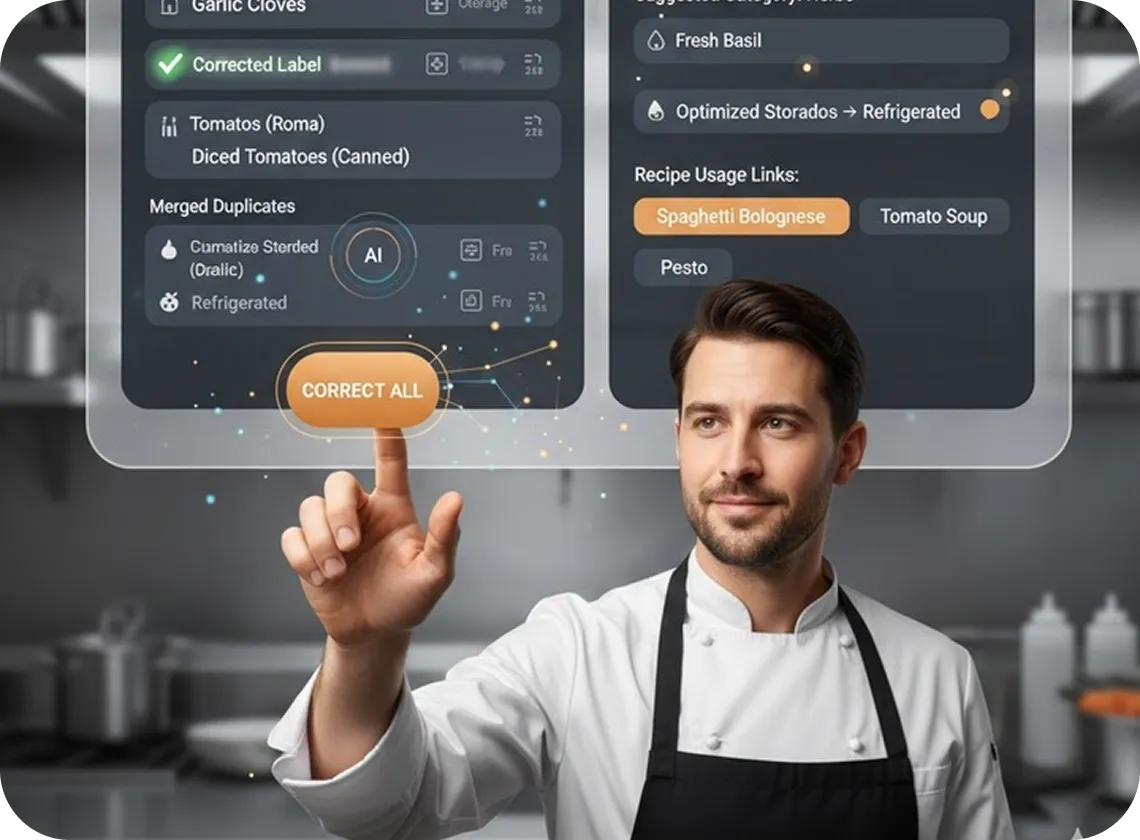
Monitor and Train Your Inventory AI
Every restaurant is different. Yes Chef OS learns your kitchen.
Correct misclassified items with one click
Merge duplicate ingredients across vendors
Tag items by category, storage zone, and recipe usage
Receive smarter alerts as the system learns your patterns
Result: The more you use it, the more accurate and tailored it becomes to your operation.
Key Features At A Glance
AI Powered Inventory Capture
Scan your walk in and storage with your phone. Let AI detect items and speed up counts.

Recipe and Menu Level Costing
See food cost per dish, per category, and per menu section based on current ingredient prices.

POS Integration (Starting With Toast)
Pull in real time sales data so your inventory updates based on what is actually sold.

Smart Ordering and Forecasting
Get recommended order guides for each vendor, based on usage trends and par levels you set.

Invoice Scanning and Price Tracking
Upload invoices and let AI extract prices, units, and vendors so you can track cost changes over time.

Multi Restaurant and Multi User
Manage multiple locations and teams from one dashboard, with role based permissions.

Real Time Dashboards and Reports
See on hand value, food cost percentage, top movers, slow movers, and waste trends in a clean visual view.
Who Yes Chef OS Is For
Yes Chef OS is built for:
Independent restaurants that want big brand control without big brand staff
Multi unit groups that need standard systems across locations
Fast casual concepts that live or die on tight margins
Bars and restaurants that want to get serious about pour cost and food cost
Operators who are tired of guessing and want decisions based on real numbers
If inventory, food cost, and ordering feel like a constant fire drill, Yes Chef OS is for you.

The Benefits For Your Restaurant
Cut Food Waste Without Starving Your Menu
Dial in ordering so you stop over buying perishables and under ordering high movers.
Stabilize Food Cost Percentage
Move from monthly surprises to predictable, controlled food cost with live data.
Save Manager Hours Every Week
Turn hours of manual counting and spreadsheet work into a fast, guided inventory walk.
Increase Profit Per Ticket
Use real cost data to adjust menu prices, portions, and specials with confidence.
Catch Problems Early
When usage does not match sales, you see it. That makes it easier to spot shrinkage, spoilage, and process issues.
Make Better Vendor Decisions
Track price changes over time. See which vendors are creeping up and where you can negotiate.
Run Multiple Locations Like One System
Give each store the autonomy to operate, while headquarters sees one clear view of inventory and costs.

What Your Day Looks Like With Yes Chef OS
Before Yes Chef OS:
You walk into the walk in, eyeball the shelves, and hope you ordered enough.
Inventory nights are dreaded and time consuming.
Food cost reports arrive weeks late and are hard to trust.
Your best managers carry inventory and ordering in their heads.
You feel like you are driving with the lights off.
Run Your Restaurant With Precision and Control
With Yes Chef OS
You start your day with a dashboard showing inventory value, variances, and alerts.
Inventory walks are scheduled, fast, and consistent across locations.
Your order guide is generated based on real usage and forecast.
Everyone on the team follows the same simple process.
You run your restaurant with clear visibility and control.
STILL NOT SURE?
Frequently Asked Questions
Is this hard for my team to use?
No. Yes Chef OS is designed so that any trained team member can run inventory walks with their phone. The system guides them step by step.
Do I need new hardware?
No special hardware is required. If your team has smartphones and a web browser, you can run Yes Chef OS.
Will this work if we already have some inventory system?
Yes. Many operators start by running Yes Chef OS alongside their existing sheets or software. Once they trust the data and see the time savings, they phase out the old system.
Can it handle multiple locations and concepts?
Yes. You can manage multiple restaurants, concepts, and storage locations from a single account, with separate reporting and consolidated reporting.
How long does it take to get value?
Most restaurants start seeing insights after the first full week of inventory, sales, and invoices flowing into the system. Within the first month, most can identify specific waste and ordering issues to fix.
Turn Your Walk into a Profit Center, Not a Mystery
COMPANY
Customer Care
LEGAL
Copyright 2026. Yes Chef OS. All Rights Reserved.